

- The Problem
- Architecture Overview
- Step 1: The HTML Template
- Step 2: Content Collection
- Step 3: Hash-Based Incremental Caching
- Step 4: Puppeteer Generation Loop
- Step 5: Hero Screenshots (Optional, Advanced)
- Step 6: Serving — The URL Builder
- Step 7: CDN Upload
- The Build Pipeline
- File Structure
- Performance Numbers
- Trade-offs
- When to Use This vs. Runtime
The Problem
Every page on your site needs an OG image. Share a blog post on Twitter/LinkedIn without one and you get a sad, blank preview card. But with 250+ pages, manually creating images is not an option.
So what are the choices?
| Approach | First-byte Latency | Cost at Scale | Failure Mode |
|---|---|---|---|
| Vercel OG (Edge Runtime) | 3-5s cold start | ~$0.50/1K invocations | Serverless timeout on complex layouts |
@vercel/og (Satori) | Runtime overhead per request | ~$20/month compute | Same — runtime = can fail |
| Runtime Puppeteer | 2-10s variable | Infrastructure cost | Heavy maintenance |
| Build-time Puppeteer | 0ms (pre-generated) | $0 runtime | Static file = cannot crash |
For a blog/docs site where content is known at deploy time, build-time generation is the clear winner. You pay the cost once during build, then serve static PNGs from CDN forever.
Architecture Overview
The pipeline has 4 layers:
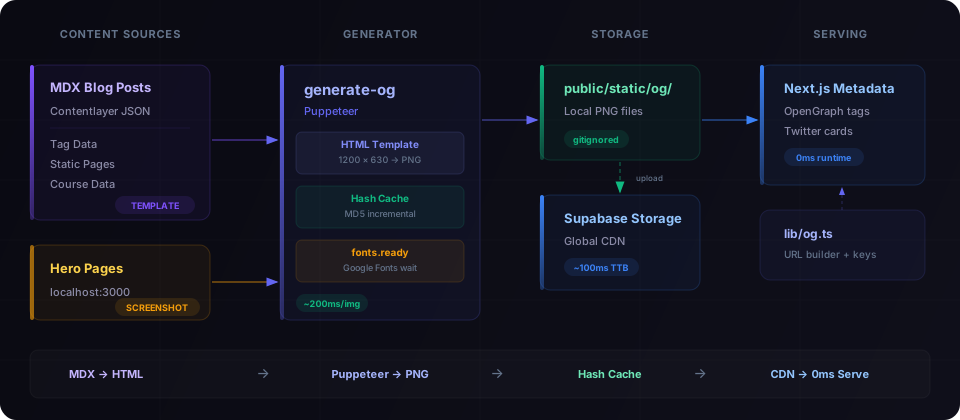
Two generation strategies:
Template-based — Blog posts, tags, courses, static pages. An HTML template is rendered, Puppeteer screenshots it. ~200ms per image.
Hero screenshots — Home page, course landing pages. Puppeteer navigates to the actual running dev server and captures the real UI. ~5-8s per image (waiting for hydration).
Step 1: The HTML Template
The template renders a 1200×630 HTML page that Puppeteer will screenshot. No images, no emoji — pure HTML/CSS with Google Fonts.
Key design decisions:
- Dynamic font sizing — titles auto-scale based on character count
- Tag-colored accents — the primary tag determines the gradient color
- Google Fonts loaded via CDN — Puppeteer waits for
document.fonts.ready - No images or emoji — pure CSS, never fails to render
📄 Full template code — scripts/og/og-template.ts
// scripts/og/og-template.ts
export interface OgTemplateData {
title: string
tags: string[]
readTime: string
subtitle: string
}
function escapeHtml(str: string): string {
return str.replace(/&/g, '&').replace(/</g, '<').replace(/>/g, '>').replace(/"/g, '"')
}
function getTitleFontSize(title: string): number {
const len = title.length
if (len > 80) return 38
if (len > 60) return 44
if (len > 45) return 52
if (len > 30) return 60
return 68
}
function getTagColor(tag: string): string {
const map: Record<string, string> = {
android: '#3DDC84',
kotlin: '#7F52FF',
react: '#61DAFB',
nextjs: '#FFFFFF',
typescript: '#3178C6',
python: '#3776AB',
ai: '#10B981',
// Add your own tag → color mappings
}
return map[tag.toLowerCase()] || '#6366F1'
}
export function renderOgTemplate(data: OgTemplateData): string {
const title = escapeHtml(data.title)
const titleFontSize = getTitleFontSize(data.title)
const primaryColor = data.tags.length > 0 ? getTagColor(data.tags[0]) : '#6366F1'
// Tag pills with accent colors
const tagPills = data.tags
.slice(0, 3)
.map((tag) => {
const color = getTagColor(tag)
return `<span style="
padding: 7px 16px;
background: ${color}12;
border: 1px solid ${color}40;
border-radius: 8px;
font-size: 14px; font-weight: 700;
color: ${color};
text-transform: uppercase;
">${escapeHtml(tag)}</span>`
})
.join('')
return `<!DOCTYPE html>
<html>
<head>
<meta charset="utf-8">
<link href="https://fonts.googleapis.com/css2?family=Be+Vietnam+Pro:wght@400;700;900&display=swap" rel="stylesheet">
<style>
* { margin: 0; padding: 0; box-sizing: border-box; }
body {
width: 1200px; height: 630px; overflow: hidden;
font-family: 'Be Vietnam Pro', sans-serif;
background: #08080C; color: #F2F2F2;
position: relative;
}
/* Accent stripe colored by primary tag */
.accent-stripe {
position: absolute; left: 0; top: 0;
width: 5px; height: 100%;
background: linear-gradient(180deg, ${primaryColor}, transparent);
}
/* Gradient mesh for depth */
.mesh {
position: absolute; border-radius: 50%;
filter: blur(120px);
width: 800px; height: 800px;
top: -400px; right: -300px;
background: radial-gradient(circle, ${primaryColor}30, transparent 70%);
}
.container {
position: relative; z-index: 1;
display: flex; flex-direction: column; justify-content: center;
height: 100%; padding: 52px 72px 88px;
gap: 20px;
}
.tags-row { display: flex; gap: 8px; }
.title {
font-size: ${titleFontSize}px; font-weight: 900;
line-height: 1.08; max-width: 1000px;
letter-spacing: -0.02em;
}
.footer {
position: absolute; bottom: 0; left: 0; right: 0;
height: 56px; display: flex; align-items: center;
justify-content: space-between; padding: 0 72px;
border-top: 1px solid rgba(255,255,255,0.06);
}
.brand { font-size: 14px; font-weight: 700; color: #94A3B8; }
.domain { font-size: 14px; color: #475569; }
</style>
</head>
<body>
<div class="accent-stripe"></div>
<div class="mesh"></div>
<div class="container">
<div class="tags-row">${tagPills}</div>
<h1 class="title">${title}</h1>
</div>
<div class="footer">
<span class="brand">YOUR BRAND</span>
<span class="domain">yourdomain.com</span>
</div>
</body>
</html>`
}
Step 2: Content Collection
The generator needs to know what pages exist. We read from Contentlayer's generated JSON output and other data sources.
Notice the key naming convention: blog__nextjs__my-post-slug, tag__react, page__blog. Double underscores replace path separators. This creates a flat, predictable filename structure in public/static/og/.
📄 Content loaders — blog, tags, static pages
// scripts/og/generate-og.ts (content loading)

interface OgEntry {
  key: string // Cache key and filename (without .png)
  data: OgTemplateData // Template input
}

/** Load published English blog posts from Contentlayer output */
async function loadBlogEntries(): Promise<OgEntry[]> {
  const dir = join(ROOT, '.contentlayer/generated/Blog')
  if (!existsSync(dir)) return []

  const files = await readdir(dir)
  const entries: OgEntry[] = []

  for (const file of files.filter((f) => f.endsWith('.mdx.json'))) {
    const post = JSON.parse(await readFile(join(dir, file), 'utf-8'))
    if (post.language === 'en' && !post.draft) {
      entries.push({
        key: `blog__${post.slug.replace(/\//g, '__')}`,
        data: {
          title: post.title,
          tags: post.tags || [],
          readTime: post.readingTime?.text || '',
          subtitle: '',
        },
      })
    }
  }
  return entries
}

/** Load tag pages from tag-data.json */
async function loadTagEntries(): Promise<OgEntry[]> {
  const tagFile = join(ROOT, 'app/tag-data.json')
  if (!existsSync(tagFile)) return []
  const tags = JSON.parse(readFileSync(tagFile, 'utf-8'))

  return Object.entries(tags).map(([tag, count]) => ({
    key: `tag__${tag}`,
    data: {
      title: `#${tag}`,
      tags: [],
      readTime: '',
      subtitle: `${count} posts`,
    },
  }))
}

/** Static pages with fixed OG content */
function getStaticPageEntries(): OgEntry[] {
  return [
    { key: 'page__blog', data: { title: 'Blog', tags: [], readTime: '', subtitle: 'Tech Articles' } },
    { key: 'page__tags', data: { title: 'Tags', tags: [], readTime: '', subtitle: 'Browse by Topic' } },
    // ... more static pages
  ]
}
Step 3: Hash-Based Incremental Caching
This is the most important piece. Without it, every build regenerates all 250+ images (~2 minutes). With caching, only changed content triggers regeneration.
The idea is simple: hash the template inputs (title, tags, readTime) → compare with previous hash → skip if identical.
function computeHash(data: OgTemplateData): string {
  const content = `${data.title}|${data.subtitle}|${data.tags.join(',')}|${data.readTime}`
  return createHash('md5').update(content).digest('hex')
}

// Incremental: only regenerate changed content
if (cache[key] === hash && existsSync(outputPath)) {
  continue // Cache hit: ~5ms vs ~200ms
}
Result: Edit one blog post → only that one image regenerates. Incremental build: +30s instead of +2min.
📄 Full cache implementation
import { createHash } from 'node:crypto'

const CACHE_FILE = join(ROOT, '.og-cache.json')

type CacheMap = Record<string, string> // key → MD5 hash

function computeHash(data: OgTemplateData): string {
  const content = `${data.title}|${data.subtitle}|${data.tags.join(',')}|${data.readTime}`
  return createHash('md5').update(content).digest('hex')
}

function loadCache(): CacheMap {
  if (!existsSync(CACHE_FILE)) return {}
  try {
    return JSON.parse(readFileSync(CACHE_FILE, 'utf-8'))
  } catch {
    return {}
  }
}

// Cache comparison loop
const cache = loadCache()
const newCache: CacheMap = {}
const toGenerate: OgEntry[] = []

for (const entry of allEntries) {
  const hash = computeHash(entry.data)
  newCache[entry.key] = hash
  const outputPath = join(OUTPUT_DIR, `${entry.key}.png`)

  // Skip if hash matches AND file exists on disk
  if (cache[entry.key] === hash && existsSync(outputPath)) {
    continue // Cache hit: ~5ms vs ~200ms
  }
  toGenerate.push(entry)
}
The .og-cache.json file should be in .gitignore — it's a local build artifact.
Step 4: Puppeteer Generation Loop
The core loop: render HTML template → load into Puppeteer → wait for fonts → screenshot.
Critical detail: The document.fonts.ready wait. Without it, Puppeteer screenshots before Google Fonts load, resulting in fallback system fonts. The 5-second timeout is a safety net for CI environments where font CDN might be slow.
📄 Puppeteer generation code
const browser = await puppeteer.launch({
  headless: true,
  args: ['--no-sandbox', '--disable-setuid-sandbox'],
})

const page = await browser.newPage()
await page.setViewport({ width: 1200, height: 630 })

for (const entry of toGenerate) {
  // 1. Render template HTML
  const html = renderOgTemplate(entry.data)

  // 2. Load into Puppeteer
  await page.setContent(html, { waitUntil: 'domcontentloaded' })

  // 3. Wait for Google Fonts to load (with timeout fallback)
  await Promise.race([page.evaluate(() => document.fonts.ready), new Promise((resolve) => setTimeout(resolve, 5000))])

  // 4. Screenshot
  const outputPath = join(OUTPUT_DIR, `${entry.key}.png`)
  await page.screenshot({ path: outputPath, type: 'png' })
}

await browser.close()
saveCache(newCache)
Step 5: Hero Screenshots (Optional, Advanced)
For pages with rich visual heroes (landing pages, course pages), template generation can't capture the real UI. Instead, we screenshot the running dev server.
This requires yarn dev running on localhost:3000. If the dev server isn't running, hero screenshots are simply skipped — only template-based images are generated.
📄 Hero screenshot implementation
const HERO_PAGES = [
  { key: 'page__home', url: '/', delay: 2000 },
  { key: 'page__kotlin-accelerator', url: '/kotlin-accelerator', delay: 5000 },
  {
    key: 'course__kotlin-accelerator',
    url: '/courses/kotlin-accelerator',
    delay: 8000,
    waitForText: 'Your path to', // Wait for specific content
  },
]

async function generateHeroImages(page: Page): Promise<number> {
  // Force dark mode
  await page.emulateMediaFeatures([{ name: 'prefers-color-scheme', value: 'dark' }])

  for (const hero of HERO_PAGES) {
    await page.goto(`http://localhost:3000${hero.url}`, {
      waitUntil: 'load',
      timeout: 30000,
    })

    // Wait for hydration
    await new Promise((resolve) => setTimeout(resolve, hero.delay))

    // Hide dev overlays, headers, footers
    await page.evaluate(() => {
      const style = document.createElement('style')
      style.textContent = `
        nextjs-portal, header, footer { display: none !important; }
        * { animation-duration: 0.001s !important; }
      `
      document.head.appendChild(style)
    })

    await page.screenshot({
      path: join(OUTPUT_DIR, `${hero.key}.png`),
      type: 'png',
    })
  }
}

// Check if localhost dev server is running
async function isLocalhostAvailable(): Promise<boolean> {
  try {
    const controller = new AbortController()
    setTimeout(() => controller.abort(), 3000)
    await fetch('http://localhost:3000', { signal: controller.signal })
    return true
  } catch {
    return false
  }
}
Step 6: Serving — The URL Builder
Page metadata needs to resolve the correct OG image URL. In development, serve from public/. In production, serve from CDN (Supabase Storage).
📄 URL builder — lib/og.ts
// lib/og.ts

import siteMetadata from '@/data/siteMetadata'

export function buildStaticOgImageUrl(key: string): string {
  const supabaseUrl = process.env.NEXT_PUBLIC_SUPABASE_URL
  if (supabaseUrl && process.env.NODE_ENV === 'production') {
    // Production: Supabase Storage CDN
    return `${supabaseUrl}/storage/v1/object/public/og/${key}.png`
  }
  // Development: local file
  return `${siteMetadata.siteUrl}/static/og/${key}.png`
}

// Key helpers matching the generator's naming convention
export const ogKey = {
  blog: (slug: string) => `blog__${slug.replace(/\//g, '__')}`,
  tag: (tag: string) => `tag__${tag}`,
  course: (slug: string) => `course__${slug.replace(/\//g, '__')}`,
  page: (name: string) => `page__${name}`,
}
Usage in Next.js page metadata:
// app/blog/[...slug]/page.tsx
import { buildStaticOgImageUrl, ogKey } from '@/lib/og'

export async function generateMetadata({ params }) {
  const slug = params.slug.join('/')
  return {
    openGraph: {
      images: [{ url: buildStaticOgImageUrl(ogKey.blog(slug)) }],
    },
    twitter: {
      card: 'summary_large_image',
      images: [buildStaticOgImageUrl(ogKey.blog(slug))],
    },
  }
}
Step 7: CDN Upload
After generation, upload to Supabase Storage for global CDN delivery:
📄 Upload script — scripts/og/upload-og.ts
// scripts/og/upload-og.ts

import { createClient } from '@supabase/supabase-js'

const supabase = createClient(process.env.NEXT_PUBLIC_SUPABASE_URL!, process.env.SUPABASE_SERVICE_ROLE_KEY!)

const files = readdirSync(OG_DIR).filter((f) => f.endsWith('.png'))

for (const file of files) {
  const fileBuffer = readFileSync(join(OG_DIR, file))

  await supabase.storage.from('og').upload(file, fileBuffer, {
    contentType: 'image/png',
    upsert: true, // Override previous uploads
  })
}
The Build Pipeline
Two npm scripts, run in sequence:
# Generate all template images + hero screenshots (if dev server running)
yarn build:og

# Upload to Supabase Storage CDN
yarn upload:og
{
  "scripts": {
    "build:og": "tsx scripts/og/generate-og.ts",
    "upload:og": "tsx scripts/og/upload-og.ts"
  }
}
Don't forget .gitignore:
public/static/og/
.og-cache.json
File Structure
scripts/og/
├── generate-og.ts    # Main generator + cache logic
├── og-template.ts    # HTML template renderer
└── upload-og.ts      # Supabase Storage uploader

lib/
└── og.ts             # URL builder + key helpers

public/static/og/     # Generated PNGs (gitignored)
.og-cache.json        # Hash cache (gitignored)
Performance Numbers
| Metric | Value |
|---|---|
| Template generation | ~200ms per image |
| Hero screenshot | ~5-8s per image (hydration wait) |
| Full build (250 images) | ~2 minutes |
| Incremental build (1 change) | ~30 seconds |
| Cached skip | ~5ms per entry |
| CDN delivery | ~100ms worldwide |
| Runtime cost | $0 |
Trade-offs
| You Get | You Lose |
|---|---|
| Zero runtime cost forever | Slower initial build |
| Instant CDN delivery (~100ms) | No per-user dynamic images |
| 100% reliability (static files) | Requires Node.js in CI |
| Incremental builds via cache | Fixed 1200×630 dimensions |
| Works offline after generation | Template changes = full rebuild |
When to Use This vs. Runtime
Use build-time if:
- Content is known at deploy time (blogs, docs, courses)
- Images don't need user-specific personalization
- You want zero ongoing runtime cost
- Reliability matters more than flexibility
Use runtime if:
- Images need user-specific data (profile cards, certificates)
- Content changes in real-time between deploys
- You're okay with serverless cold-start latency
- You need multiple image sizes dynamically
The best infrastructure is the kind you deploy once and never think about again. Build-time OG generation with Puppeteer is exactly that — 250 images generated, cached, uploaded to CDN, and served at the speed of a static file.