

Introduction
State management in Android has evolved from raw LiveData and manual callbacks to structured patterns like MVI. But most MVI frameworks come with boilerplate, steep learning curves, or tight coupling to specific architectures.
DRE-KT takes a different approach. It implements the DRE (Dispatch - Reduce - Effects) pattern - a unidirectional data flow architecture where Actions are dispatched, a pure Reducer computes new state plus side effects, and Effects are handled externally.
The result is a library that is:
- Lightweight - two modules, minimal dependencies
- Testable - pure reducers mean simple unit tests without coroutine machinery
- Flexible - works standalone or with Android ViewModel
In this tutorial, you will set up DRE-KT in an Android project and build a complete feature from contract definition to UI integration.
What is the DRE Pattern?
The DRE pattern splits state management into three distinct responsibilities:
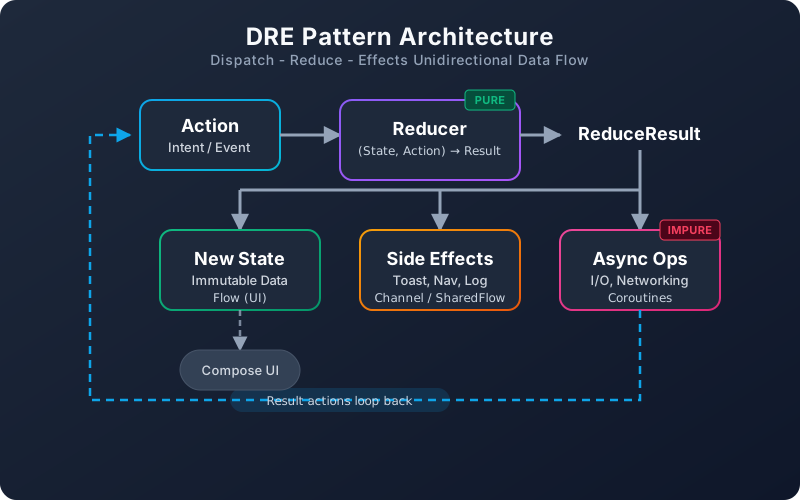
| Component | Role | Purity |
|---|---|---|
| Dispatch | Send actions (user events, API results) into the store | Impure (triggers) |
| Reduce | Compute new state + declare side effects from current state + action | Pure function |
| Effects | Execute side effects (toasts, navigation, analytics) | Impure (external) |
The key insight: your Reducer is a pure function. Given the same state and action, it always returns the same result. All I/O and side effects happen outside the reducer boundary.
Setting Up DRE-KT
Add Dependencies
DRE-KT is published on Maven Central under io.github.dantech0xff.
// build.gradle.kts (module-level)
dependencies {
    // Core module - platform-agnostic
    implementation("io.github.dantech0xff:dre-core:<latest-version>")

    // Android module - ViewModel integration
    implementation("io.github.dantech0xff:dre-android:<latest-version>")
}
Requirements: Kotlin 2.3+, Java 17+, Android minSdk 26.
Module Structure
| Module | Purpose | Dependencies |
|---|---|---|
dre-core | Platform-agnostic dispatch/reducer logic | kotlinx-coroutines |
dre-android | Android ViewModel integration | dre-core, lifecycle-viewmodel |
Use dre-core alone for Kotlin Multiplatform or non-Android projects. Add dre-android for ViewModel support.
Building a Feature: Step by Step
Let's build a data loading feature - a list screen that fetches items from an API, shows loading state, and handles errors.
Step 1: Define the Contract
Every DRE feature starts with four sealed types that form the contract:
// ItemListContract.kt

data class ItemListState(
    val items: List<Item> = emptyList(),
    val isLoading: Boolean = false,
    val error: String? = null
) : DreState

sealed interface ItemListAction : DreAction {
    data object LoadItems : ItemListAction
    data class ItemsLoaded(val items: List<Item>) : ItemListAction
    data class LoadFailed(val message: String) : ItemListAction
    data class DeleteItem(val id: String) : ItemListAction
    data class ItemDeleted(val id: String) : ItemListAction
}

sealed interface ItemListEffect : DreEffect {
    data class ShowError(val message: String) : ItemListEffect
    data class ShowSuccess(val message: String) : ItemListEffect
}

sealed interface ItemListAsyncOp : DreAsyncOp {
    data object FetchItems : ItemListAsyncOp
    data class RemoveItem(val id: String) : ItemListAsyncOp
}
This contract is your feature's API surface. Every possible state, action, effect, and async operation is declared upfront - no surprises at runtime.
Step 2: Implement the Reducer
The reducer is a pure function. No network calls, no database queries, no side effects - just state transitions:
// ItemListReducer.kt

class ItemListReducer : Reducer<ItemListState, ItemListAction, ItemListEffect, ItemListAsyncOp> {

    override fun reduce(
        state: ItemListState,
        action: ItemListAction
    ): ReduceResult<ItemListState, ItemListEffect, ItemListAsyncOp> = when (action) {

        is ItemListAction.LoadItems -> ReduceResult(
            state = state.copy(isLoading = true, error = null),
            asyncOp = ItemListAsyncOp.FetchItems,
        )

        is ItemListAction.ItemsLoaded -> ReduceResult(
            state = state.copy(items = action.items, isLoading = false)
        )

        is ItemListAction.LoadFailed -> ReduceResult(
            state = state.copy(isLoading = false, error = action.message),
            sideEffects = listOf(ItemListEffect.ShowError(action.message))
        )

        is ItemListAction.DeleteItem -> ReduceResult(
            state = state,
            asyncOp = ItemListAsyncOp.RemoveItem(action.id),
        )

        is ItemListAction.ItemDeleted -> ReduceResult(
            state = state.copy(
                items = state.items.filter { it.id != action.id }
            ),
            sideEffects = listOf(ItemListEffect.ShowSuccess("Item deleted"))
        )
    }
}
Notice how ReduceResult bundles three things together:
- New state - the updated immutable state
- Side effects - a list of fire-and-forget effects (toasts, analytics)
- Async op - an optional single I/O operation to trigger (API call, DB query)
Step 3: Create the ViewModel
The ViewModel wires everything together - it owns the store and handles async operations:
// ItemListViewModel.kt

class ItemListViewModel(
    private val repository: ItemRepository
) : DreStoreViewModel<ItemListState, ItemListAction, ItemListEffect, ItemListAsyncOp>(
    reducer = ItemListReducer()
) {
    override val initialState = ItemListState()

    override suspend fun executeAsyncOp(
        op: ItemListAsyncOp,
        stateSnapshot: ItemListState
    ) {
        when (op) {
            is ItemListAsyncOp.FetchItems -> {
                try {
                    val items = repository.getItems()
                    dispatch(ItemListAction.ItemsLoaded(items))
                } catch (e: Exception) {
                    dispatch(ItemListAction.LoadFailed(e.message ?: "Unknown error"))
                }
            }

            is ItemListAsyncOp.RemoveItem -> {
                try {
                    repository.deleteItem(op.id)
                    dispatch(ItemListAction.ItemDeleted(op.id))
                } catch (e: Exception) {
                    dispatch(ItemListAction.LoadFailed("Delete failed: ${e.message}"))
                }
            }
        }
    }

    fun loadItems() = dispatch(ItemListAction.LoadItems)
    fun deleteItem(id: String) = dispatch(ItemListAction.DeleteItem(id))
}
The executeAsyncOp method is where impure I/O lives. Results are fed back as new actions - closing the unidirectional loop.
Step 4: Handle Side Effects
DRE-KT routes side effects through SideEffectHandler - not a collected Flow. Define a handler and register it in the ViewModel:
// ItemListSideEffectHandler.kt

class ItemListSideEffectHandler(
    private val snackbarHostState: SnackbarHostState
) : SideEffectHandler<ItemListEffect> {

    override suspend fun handle(effect: ItemListEffect) {
        when (effect) {
            is ItemListEffect.ShowError -> snackbarHostState.showSnackbar(effect.message)
            is ItemListEffect.ShowSuccess -> snackbarHostState.showSnackbar(effect.message)
        }
    }
}
Register it in the ViewModel by overriding sideEffectHandlers:
// In ItemListViewModel
override val sideEffectHandlers: List<SideEffectHandler<ItemListEffect>>
    get() = listOf(effectHandler)
Step 5: Connect to Compose UI
// ItemListScreen.kt

@Composable
fun ItemListScreen(viewModel: ItemListViewModel) {
    val state by viewModel.state.collectAsStateWithLifecycle()

    // Load items on first composition
    LaunchedEffect(Unit) {
        viewModel.loadItems()
    }

    // Render UI based on state
    when {
        state.isLoading -> LoadingIndicator()
        state.error != null -> ErrorMessage(state.error!!)
        else -> ItemList(
            items = state.items,
            onDelete = viewModel::deleteItem
        )
    }
}
The UI is a pure function of state. It observes state via StateFlow, dispatches actions through ViewModel methods, and side effects are handled externally by SideEffectHandler instances.
Testing Pure Reducers
The biggest advantage of the DRE pattern is testability. Since reducers are pure functions, tests are simple assertions - no coroutines, no mocks, no test dispatchers:
class ItemListReducerTest {

    private val reducer = ItemListReducer()

    @Test
    fun `LoadItems sets loading state and triggers fetch`() {
        val result = reducer.reduce(
            state = ItemListState(),
            action = ItemListAction.LoadItems
        )

        assertThat(result.state.isLoading).isTrue()
        assertThat(result.state.error).isNull()
        assertThat(result.asyncOp).isEqualTo(ItemListAsyncOp.FetchItems)
    }

    @Test
    fun `ItemsLoaded updates items and clears loading`() {
        val items = listOf(Item("1", "Test"))
        val result = reducer.reduce(
            state = ItemListState(isLoading = true),
            action = ItemListAction.ItemsLoaded(items)
        )

        assertThat(result.state.items).isEqualTo(items)
        assertThat(result.state.isLoading).isFalse()
        assertThat(result.sideEffects).isEmpty()
    }

    @Test
    fun `DeleteItem triggers remove async op`() {
        val result = reducer.reduce(
            state = ItemListState(items = listOf(Item("1", "Test"))),
            action = ItemListAction.DeleteItem("1")
        )

        assertThat(result.asyncOp).isEqualTo(ItemListAsyncOp.RemoveItem("1"))
    }

    @Test
    fun `LoadFailed shows error effect`() {
        val result = reducer.reduce(
            state = ItemListState(isLoading = true),
            action = ItemListAction.LoadFailed("Network error")
        )

        assertThat(result.state.isLoading).isFalse()
        assertThat(result.state.error).isEqualTo("Network error")
        assertThat(result.sideEffects).containsExactly(
            ItemListEffect.ShowError("Network error")
        )
    }
}
No runTest, no TestDispatcher, no turbine. Just function input and output.
Using DreStore Without ViewModel
For non-Android projects or when you need more control, use DreStore directly:
val store = DreStore(
    reducer = ItemListReducer(),
    initialState = ItemListState(),
    scope = coroutineScope,
    dispatchContext = Dispatchers.Main.immediate,
    onAsyncOp = { op, snapshot ->
        when (op) {
            is ItemListAsyncOp.FetchItems -> {
                val items = repository.getItems()
                store.dispatch(ItemListAction.ItemsLoaded(items))
            }
            // handle other ops
        }
    }
)

// Observe state
store.state.collect { state -> /* update UI */ }

// Dispatch actions
store.dispatch(ItemListAction.LoadItems)
This makes DRE-KT usable in Kotlin Multiplatform, backend services, or anywhere you need predictable state management.
When to Use DRE-KT
DRE-KT fits well when you need:
- Predictable state transitions - every state change goes through the reducer
- Easy testing - pure reducers, no async test infrastructure
- Separation of concerns - I/O stays out of state logic
- Lightweight setup - no code generation, no annotation processing
For simple screens with minimal state, a plain ViewModel with MutableStateFlow might be enough. DRE-KT shines when your feature has complex state interactions, multiple async operations, or needs thorough test coverage.
Conclusion
DRE-KT brings the best parts of MVI - unidirectional data flow, immutable state, and pure reducers - without the ceremony of larger frameworks. The library is open source on GitHub and available on Maven Central.
Start with one feature. Define the contract, implement the reducer, write the tests. Once you see how clean the separation is, you will want it everywhere.