

Giới thiệu
State management trên Android đã phát triển từ LiveData thô và callback thủ công sang các pattern có cấu trúc như MVI. Nhưng hầu hết các MVI framework đi kèm với boilerplate nhiều, learning curve cao, hoặc gắn chặt vào một kiến trúc cụ thể.
DRE-KT đi theo một hướng khác. Thư viện này triển khai DRE (Dispatch - Reduce - Effects) pattern - một kiến trúc unidirectional data flow nơi Action được dispatch, một pure Reducer tính toán state mới cùng side effects, và Effects được xử lý bên ngoài.
Kết quả là một library:
- Nhẹ - hai module, ít dependency
- Dễ test - pure reducer nghĩa là unit test đơn giản, không cần coroutine machinery
- Linh hoạt - chạy độc lập hoặc tích hợp Android ViewModel
Trong bài hướng dẫn này, bạn sẽ setup DRE-KT trong một Android project và build một feature hoàn chỉnh từ contract definition đến UI integration.
DRE Pattern là gì?
DRE pattern chia state management thành ba trách nhiệm riêng biệt:
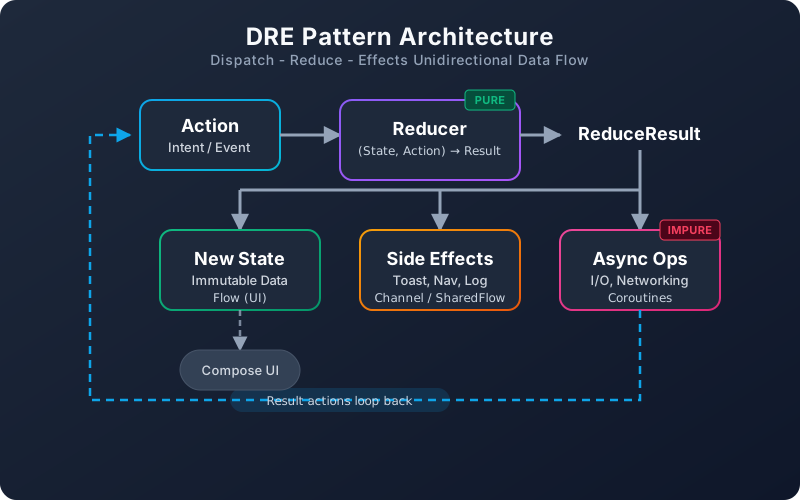
| Component | Vai trò | Purity |
|---|---|---|
| Dispatch | Gửi action (user event, API result) vào store | Impure (trigger) |
| Reduce | Tính toán state mới + khai báo side effect từ state hiện tại + action | Pure function |
| Effects | Thực thi side effect (toast, navigation, analytics) | Impure (external) |
Điểm mấu chốt: Reducer của bạn là pure function. Cùng state và action đầu vào, luôn cho ra cùng kết quả. Toàn bộ I/O và side effect xảy ra bên ngoài ranh giới reducer.
Cài đặt DRE-KT
Thêm Dependencies
DRE-KT được publish trên Maven Central dưới group io.github.dantech0xff.
// build.gradle.kts (module-level)
dependencies {
    // Core module - platform-agnostic
    implementation("io.github.dantech0xff:dre-core:<latest-version>")

    // Android module - ViewModel integration
    implementation("io.github.dantech0xff:dre-android:<latest-version>")
}
Yêu cầu: Kotlin 2.3+, Java 17+, Android minSdk 26.
Cấu trúc Module
| Module | Mục đích | Dependencies |
|---|---|---|
dre-core | Dispatch/reducer logic, không phụ thuộc platform | kotlinx-coroutines |
dre-android | Tích hợp Android ViewModel | dre-core, lifecycle-viewmodel |
Dùng dre-core riêng cho Kotlin Multiplatform hoặc project không phải Android. Thêm dre-android khi cần ViewModel support.
Xây dựng Feature: Từng bước
Hãy build một data loading feature - màn hình list lấy dữ liệu từ API, hiện loading state, và xử lý error.
Bước 1: Định nghĩa Contract
Mỗi DRE feature bắt đầu với bốn sealed type tạo thành contract:
// ItemListContract.kt

data class ItemListState(
    val items: List<Item> = emptyList(),
    val isLoading: Boolean = false,
    val error: String? = null
) : DreState

sealed interface ItemListAction : DreAction {
    data object LoadItems : ItemListAction
    data class ItemsLoaded(val items: List<Item>) : ItemListAction
    data class LoadFailed(val message: String) : ItemListAction
    data class DeleteItem(val id: String) : ItemListAction
    data class ItemDeleted(val id: String) : ItemListAction
}

sealed interface ItemListEffect : DreEffect {
    data class ShowError(val message: String) : ItemListEffect
    data class ShowSuccess(val message: String) : ItemListEffect
}

sealed interface ItemListAsyncOp : DreAsyncOp {
    data object FetchItems : ItemListAsyncOp
    data class RemoveItem(val id: String) : ItemListAsyncOp
}
Contract này là API surface của feature. Mọi state, action, effect, và async operation đều được khai báo từ đầu - không có bất ngờ lúc runtime.
Bước 2: Implement Reducer
Reducer là pure function. Không network call, không database query, không side effect - chỉ có state transition:
// ItemListReducer.kt

class ItemListReducer : Reducer<ItemListState, ItemListAction, ItemListEffect, ItemListAsyncOp> {

    override fun reduce(
        state: ItemListState,
        action: ItemListAction
    ): ReduceResult<ItemListState, ItemListEffect, ItemListAsyncOp> = when (action) {

        is ItemListAction.LoadItems -> ReduceResult(
            state = state.copy(isLoading = true, error = null),
            asyncOp = ItemListAsyncOp.FetchItems,
        )

        is ItemListAction.ItemsLoaded -> ReduceResult(
            state = state.copy(items = action.items, isLoading = false)
        )

        is ItemListAction.LoadFailed -> ReduceResult(
            state = state.copy(isLoading = false, error = action.message),
            sideEffects = listOf(ItemListEffect.ShowError(action.message))
        )

        is ItemListAction.DeleteItem -> ReduceResult(
            state = state,
            asyncOp = ItemListAsyncOp.RemoveItem(action.id),
        )

        is ItemListAction.ItemDeleted -> ReduceResult(
            state = state.copy(
                items = state.items.filter { it.id != action.id }
            ),
            sideEffects = listOf(ItemListEffect.ShowSuccess("Item deleted"))
        )
    }
}
Chú ý cách ReduceResult gói ba thứ lại:
- New state - state bất biến đã cập nhật
- Side effects - danh sách fire-and-forget effect (toast, analytics)
- Async op - một I/O operation tùy chọn duy nhất cần kích hoạt (API call, DB query)
Bước 3: Tạo ViewModel
ViewModel kết nối mọi thứ - nó sở hữu store và xử lý async operation:
// ItemListViewModel.kt

class ItemListViewModel(
    private val repository: ItemRepository
) : DreStoreViewModel<ItemListState, ItemListAction, ItemListEffect, ItemListAsyncOp>(
    reducer = ItemListReducer()
) {
    override val initialState = ItemListState()

    override suspend fun executeAsyncOp(
        op: ItemListAsyncOp,
        stateSnapshot: ItemListState
    ) {
        when (op) {
            is ItemListAsyncOp.FetchItems -> {
                try {
                    val items = repository.getItems()
                    dispatch(ItemListAction.ItemsLoaded(items))
                } catch (e: Exception) {
                    dispatch(ItemListAction.LoadFailed(e.message ?: "Unknown error"))
                }
            }

            is ItemListAsyncOp.RemoveItem -> {
                try {
                    repository.deleteItem(op.id)
                    dispatch(ItemListAction.ItemDeleted(op.id))
                } catch (e: Exception) {
                    dispatch(ItemListAction.LoadFailed("Delete failed: ${e.message}"))
                }
            }
        }
    }

    fun loadItems() = dispatch(ItemListAction.LoadItems)
    fun deleteItem(id: String) = dispatch(ItemListAction.DeleteItem(id))
}
Method executeAsyncOp là nơi chứa I/O impure. Kết quả được đưa ngược lại dưới dạng action mới - khép kín vòng lặp unidirectional.
Bước 4: Xử lý Side Effect
DRE-KT route side effect qua SideEffectHandler - không phải collected Flow. Định nghĩa handler và đăng ký trong ViewModel:
// ItemListSideEffectHandler.kt

class ItemListSideEffectHandler(
    private val snackbarHostState: SnackbarHostState
) : SideEffectHandler<ItemListEffect> {

    override suspend fun handle(effect: ItemListEffect) {
        when (effect) {
            is ItemListEffect.ShowError -> snackbarHostState.showSnackbar(effect.message)
            is ItemListEffect.ShowSuccess -> snackbarHostState.showSnackbar(effect.message)
        }
    }
}
Đăng ký trong ViewModel bằng cách override sideEffectHandlers:
// Trong ItemListViewModel
override val sideEffectHandlers: List<SideEffectHandler<ItemListEffect>>
    get() = listOf(effectHandler)
Bước 5: Kết nối Compose UI
// ItemListScreen.kt

@Composable
fun ItemListScreen(viewModel: ItemListViewModel) {
    val state by viewModel.state.collectAsStateWithLifecycle()

    // Load item khi composition lần đầu
    LaunchedEffect(Unit) {
        viewModel.loadItems()
    }

    // Render UI dựa trên state
    when {
        state.isLoading -> LoadingIndicator()
        state.error != null -> ErrorMessage(state.error!!)
        else -> ItemList(
            items = state.items,
            onDelete = viewModel::deleteItem
        )
    }
}
UI là pure function của state. Nó observe state qua StateFlow, dispatch action qua ViewModel method, và side effect được xử lý bên ngoài bởi SideEffectHandler.
Test Pure Reducer
Ưu điểm lớn nhất của DRE pattern là khả năng test. Vì reducer là pure function, test chỉ là các assertion đơn giản - không cần coroutine, mock, hay test dispatcher:
class ItemListReducerTest {

    private val reducer = ItemListReducer()

    @Test
    fun `LoadItems sets loading state and triggers fetch`() {
        val result = reducer.reduce(
            state = ItemListState(),
            action = ItemListAction.LoadItems
        )

        assertThat(result.state.isLoading).isTrue()
        assertThat(result.state.error).isNull()
        assertThat(result.asyncOp).isEqualTo(ItemListAsyncOp.FetchItems)
    }

    @Test
    fun `ItemsLoaded updates items and clears loading`() {
        val items = listOf(Item("1", "Test"))
        val result = reducer.reduce(
            state = ItemListState(isLoading = true),
            action = ItemListAction.ItemsLoaded(items)
        )

        assertThat(result.state.items).isEqualTo(items)
        assertThat(result.state.isLoading).isFalse()
        assertThat(result.sideEffects).isEmpty()
    }

    @Test
    fun `DeleteItem triggers remove async op`() {
        val result = reducer.reduce(
            state = ItemListState(items = listOf(Item("1", "Test"))),
            action = ItemListAction.DeleteItem("1")
        )

        assertThat(result.asyncOp).isEqualTo(ItemListAsyncOp.RemoveItem("1"))
    }

    @Test
    fun `LoadFailed shows error effect`() {
        val result = reducer.reduce(
            state = ItemListState(isLoading = true),
            action = ItemListAction.LoadFailed("Network error")
        )

        assertThat(result.state.isLoading).isFalse()
        assertThat(result.state.error).isEqualTo("Network error")
        assertThat(result.sideEffects).containsExactly(
            ItemListEffect.ShowError("Network error")
        )
    }
}
Không runTest, không TestDispatcher, không turbine. Chỉ có input và output của function.
Dùng DreStore không cần ViewModel
Với project không phải Android hoặc khi bạn cần kiểm soát nhiều hơn, dùng DreStore trực tiếp:
val store = DreStore(
    reducer = ItemListReducer(),
    initialState = ItemListState(),
    scope = coroutineScope,
    dispatchContext = Dispatchers.Main.immediate,
    onAsyncOp = { op, snapshot ->
        when (op) {
            is ItemListAsyncOp.FetchItems -> {
                val items = repository.getItems()
                store.dispatch(ItemListAction.ItemsLoaded(items))
            }
            // xử lý các op khác
        }
    }
)

// Observe state
store.state.collect { state -> /* cập nhật UI */ }

// Dispatch action
store.dispatch(ItemListAction.LoadItems)
Điều này giúp DRE-KT có thể dùng trong Kotlin Multiplatform, backend service, hoặc bất kỳ đâu bạn cần state management dự đoán được.
Khi nào nên dùng DRE-KT
DRE-KT phù hợp khi bạn cần:
- State transition dự đoán được - mọi thay đổi state đều đi qua reducer
- Test dễ dàng - pure reducer, không cần async test infrastructure
- Tách biệt concern - I/O tách khỏi state logic
- Setup nhẹ - không code generation, không annotation processing
Với màn hình đơn giản ít state, một ViewModel thường với MutableStateFlow có thể đủ dùng. DRE-KT tỏa sáng khi feature của bạn có state interaction phức tạp, nhiều async operation, hoặc cần test coverage kỹ lưỡng.
Kết luận
DRE-KT mang những phần tốt nhất của MVI - unidirectional data flow, immutable state, và pure reducer - mà không có ceremony của các framework lớn hơn. Thư viện là open source trên GitHub và có sẵn trên Maven Central.
Hãy bắt đầu với một feature. Định nghĩa contract, implement reducer, viết test. Khi bạn thấy sự tách biệt sạch sẽ này, bạn sẽ muốn dùng nó ở mọi nơi.