

Mobile Action Pro Course
Bài viết này dùng production code từ khóa Mobile Action Pro. Học Compose performance, Clean Architecture, và ship ứng dụng AI quiz app thực tế.
Compose chạy qua 3 phase: Composition → Layout → Draw. Phần lớn animation code mặc định chạy ở Composition phase - mỗi frame thay đổi đều trigger recomposition. graphicsLayer cho phép bạn đẩy visual effects xuống Draw phase, nơi thay đổi chỉ redraw mà không recompose hay relayout.
Bài viết này giải thích khi nào và cách dùng graphicsLayer để tối ưu performance, minh họa qua case study WheelPicker thực tế.
Compose 3 Phases và vấn đề Performance
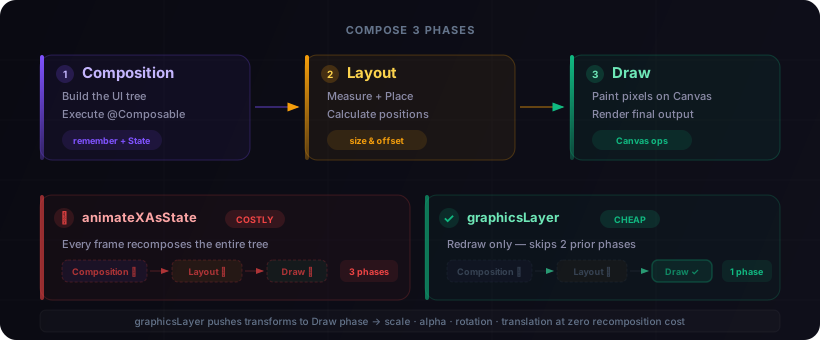
Khi bạn dùng animateFloatAsState hay animateColorAsState, giá trị mới tạo ra State change - Compose phải chạy lại Composition + Layout + Draw. Với graphicsLayer, bạn chỉ tốn Draw.
Sự khác biệt này trở nên quan trọng trong scroll-driven animations, nơi state change xảy ra mỗi frame. Một LazyColumn với 5 visible items, mỗi item giữ 3 animation states, nghĩa là 15+ recomposition triggers mỗi frame - nhiều hơn rất nhiều so với những gì GPU thực sự cần.
graphicsLayer làm được gì?
Trong lambda graphicsLayer, bạn truy cập trực tiếp các transform properties:
| Property | Mô tả |
|---|---|
scaleX, scaleY | Thu phóng |
alpha | Độ mờ |
translationX, translationY | Dịch chuyển |
rotationX, rotationY, rotationZ | Xoay 3D |
shadowElevation | Bóng đổ |
clip, shape | Crop theo hình |
Thay đổi bất kỳ property nào ở đây - chỉ redraw, không recompose.
Điểm mấu chốt: lambda version của graphicsLayer capture state reads vào draw time, không phải composition time. Đây chính là cách Compose biết nó có thể skip hoàn toàn hai phases đầu.
Case Study: WheelPicker - Từ 25+ xuống 0 Recompositions/frame
Vấn đề
Một time picker dạng scroll wheel - items ở center lớn và rõ, items xa center nhỏ và mờ dần. Code ban đầu:
var centerIndex by remember { mutableIntStateOf(initialIndex) }

// State change mỗi scroll frame → recompose toàn bộ LazyColumn
LaunchedEffect(listState) {
    snapshotFlow { listState.firstVisibleItemIndex }
        .collectLatest { centerIndex = it }
}

items(items.size) { index ->
    val isCenter = centerIndex == index
    // 3 animation states per item × 5 visible items = 15 recomposition triggers/frame
    val fontSize by animateFloatAsState(if (isCenter) 32f else 15f)
    val fontWeight by animateFloatAsState(if (isCenter) 700f else 350f)
    val color by animateColorAsState(if (isCenter) Purple600 else Grey400)
}
Chi phí mỗi scroll frame: ~25+ recompositions - centerIndex state change cascade + 15 Animatable triggers + offscreen compositing buffer.
Giải pháp: Chuyển hết vào graphicsLayer
items(items.size, key = { it }, contentType = { 0 }) { index ->
    Box(
        Modifier.height(itemHeightDp).graphicsLayer {
            // Tính khoảng cách item so với center viewport
            val info = listState.layoutInfo
            val viewportCenter =
                info.viewportStartOffset + info.viewportSize.height / 2f
            val itemCenter = info.visibleItemsInfo
                .firstOrNull { it.index == index + halfVisible }
                ?.let { it.offset + it.size / 2f } ?: viewportCenter

            val distance =
                (abs(itemCenter - viewportCenter) / itemHeightPx).coerceIn(0f, 2f)
            val eased = (distance / 2f).let { it * it }  // quadratic easing

            // Tất cả visual effects - zero recomposition
            scaleX = lerp(1f, 0.3f, eased)
            scaleY = scaleX
            alpha = scaleX
            rotationX =
                ((itemCenter - viewportCenter) / itemHeightPx)
                    .coerceIn(-2f, 2f) * -18f
            translationY =
                ((itemCenter - viewportCenter) / itemHeightPx)
                    .coerceIn(-2f, 2f) * 2f
        }
    ) { Text(items[index], style = baseTextStyle) }
}
Kết quả: 0 recompositions per scroll frame. Scale, alpha, rotation, translation - tất cả tính từ scroll offset trong draw phase.
So sánh
| Before | After | |
|---|---|---|
| Recompositions/frame | ~25+ | 0 |
| Animation states/item | 3 Animatable | 0 |
| Phase chạy effects | Composition | Draw |
| Offscreen buffer | Yes | No |
Trên thiết bị mid-range, đây là sự khác biệt giữa jank thấy rõ và scroll mượt mà.
Mobile Action Pro Course
WheelPicker này nằm trong project AI quiz app thực tế của khóa Mobile Action Pro - nơi bạn học Compose performance patterns bằng cách ship production code.
Kỹ thuật bổ trợ
1. Callback chỉ khi scroll dừng
// TRƯỚC: fire mỗi frame
snapshotFlow { listState.firstVisibleItemIndex }
    .collectLatest { centerIndex = it }

// SAU: fire 1 lần khi settle
snapshotFlow { listState.isScrollInProgress }
    .distinctUntilChanged()
    .collectLatest {
        if (!it) onSelectedChanged(listState.firstVisibleItemIndex)
    }
Pattern này kết hợp tốt với Kotlin Coroutines - snapshotFlow + distinctUntilChanged rẻ hơn rất nhiều so với state updates mỗi frame.
2. Gradient overlay thay offscreen compositing
// TRƯỚC: tốn buffer allocation + blend mode
.graphicsLayer { compositingStrategy = CompositingStrategy.Offscreen }
.drawWithContent { drawRect(blendMode = BlendMode.DstIn) }

// SAU: gradient vẽ on-top, không cần buffer
Box(Modifier.matchParentSize().drawWithContent {
    drawContent()
    drawRect(
        Brush.verticalGradient(listOf(White, Transparent)),
        endY = fadeRatio
    )
    drawRect(
        Brush.verticalGradient(listOf(Transparent, White)),
        startY = size.height - fadeRatio,
        endY = size.height
    )
})
Offscreen compositing phải allocate một bitmap buffer riêng - tốn kém trên thiết bị hạn chế memory. Gradient overlay tạo visual effect tương tự mà không cần allocation đó.
3. LazyColumn recycling hints
items(count, key = { it }, contentType = { 0 })
contentType giúp LazyColumn reuse composition slots hiệu quả hơn khi tất cả items cùng type. Kết hợp với stable key, giảm thiểu composition work mà LazyColumn phải làm khi scroll.
Khi nào dùng graphicsLayer vs animateXAsState?
Dùng graphicsLayer | Dùng animateXAsState |
|---|---|
| Scroll-driven effects (LazyColumn, Pager) | One-shot transitions (click, toggle) |
| Nhiều items cùng animate mỗi frame | Ít items, ít tần suất |
| Chỉ cần transform (scale, alpha, rotation) | Cần thay đổi content (fontSize, color, text) |
| Performance-critical paths | Prototype / low-item-count UI |
graphicsLayer chỉ hỗ trợ transform properties - không thay đổi được text size hay color thực tế. Nhưng với scroll animations, scale + alpha thường tạo visual effect tương đương mà zero cost.
Quyết định khá rõ ràng: nếu animation của bạn chạy từ giá trị liên tục thay đổi (scroll offset, drag position, sensor data), graphicsLayer gần như luôn là lựa chọn đúng. Với discrete state transitions, animateXAsState cho ergonomics tốt hơn với performance chấp nhận được.
Tóm lại
graphicsLayerchạy ở Draw phase - skip Composition + Layout hoàn toàn- Tính visual effects từ scroll offset trong lambda, không qua State
- 3D effects miễn phí -
rotationX,translationYcùng phase, thêm không tốn gì - Kết hợp gradient overlay để tránh offscreen compositing overhead
- Callback settle-only - không fire state change mỗi scroll frame
Course
Thực hành Jetpack Compose Performance ngay
Khóa Mobile Action Pro dạy graphicsLayer, tối ưu LazyColumn, và các Compose patterns thực chiến - qua project AI quiz app nơi các kỹ thuật này được áp dụng.
- Jetpack Compose với performance best practices
- Clean Architecture, MVVM, Dependency Injection
- 9 modules, 108 bài thực hành
- Truy cập trọn đời & hỗ trợ cộng đồng