# Build-Time OG Image Generation with Next.js and Puppeteer
> A complete guide to generating OG images at build time using Puppeteer. Zero runtime cost, hash-based incremental caching, and CDN delivery — the architecture behind 250+ auto-generated social preview images.
- URL: https://dantech.academy/en/blog/nextjs/build-time-og-image-generation-nextjs-puppeteer
- Published: 2026-04-05
- Reading time: 11 min
- Tags: nextjs, puppeteer, performance, seo
## The Problem
Every page on your site needs an OG image. Share a blog post on Twitter/LinkedIn without one and you get a sad, blank preview card. But with 250+ pages, manually creating images is not an option.
So what are the choices?
| Approach | First-byte Latency | Cost at Scale | Failure Mode |
| ------------------------ | ---------------------------- | --------------------- | ------------------------------------- |
| Vercel OG (Edge Runtime) | 3-5s cold start | ~$0.50/1K invocations | Serverless timeout on complex layouts |
| `@vercel/og` (Satori) | Runtime overhead per request | ~$20/month compute | Same — runtime = can fail |
| Runtime Puppeteer | 2-10s variable | Infrastructure cost | Heavy maintenance |
| **Build-time Puppeteer** | **0ms (pre-generated)** | **$0 runtime** | **Static file = cannot crash** |
For a blog/docs site where content is known at deploy time, build-time generation is the clear winner. You pay the cost once during build, then serve static PNGs from CDN forever.
## Architecture Overview
The pipeline has 4 layers:
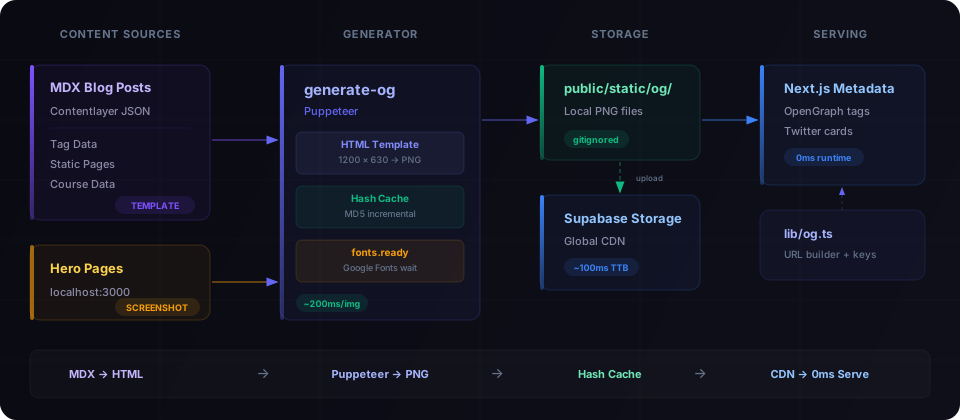
**Two generation strategies:**
1. **Template-based** — Blog posts, tags, courses, static pages. An HTML template is rendered, Puppeteer screenshots it. ~200ms per image.
2. **Hero screenshots** — Home page, course landing pages. Puppeteer navigates to the actual running dev server and captures the real UI. ~5-8s per image (waiting for hydration).
## Step 1: The HTML Template
The template renders a 1200×630 HTML page that Puppeteer will screenshot. No images, no emoji — pure HTML/CSS with Google Fonts.
Key design decisions:
- **Dynamic font sizing** — titles auto-scale based on character count
- **Tag-colored accents** — the primary tag determines the gradient color
- **Google Fonts loaded via CDN** — Puppeteer waits for `document.fonts.ready`
- **No images or emoji** — pure CSS, never fails to render
📄 Full template code — scripts/og/og-template.ts
```typescript
// scripts/og/og-template.ts
export interface OgTemplateData {
title: string
tags: string[]
readTime: string
subtitle: string
}
function escapeHtml(str: string): string {
return str.replace(/&/g, '&').replace(//g, '>').replace(/"/g, '"')
}
function getTitleFontSize(title: string): number {
const len = title.length
if (len > 80) return 38
if (len > 60) return 44
if (len > 45) return 52
if (len > 30) return 60
return 68
}
function getTagColor(tag: string): string {
const map: Record = {
android: '#3DDC84',
kotlin: '#7F52FF',
react: '#61DAFB',
nextjs: '#FFFFFF',
typescript: '#3178C6',
python: '#3776AB',
ai: '#10B981',
// Add your own tag → color mappings
}
return map[tag.toLowerCase()] || '#6366F1'
}
export function renderOgTemplate(data: OgTemplateData): string {
const title = escapeHtml(data.title)
const titleFontSize = getTitleFontSize(data.title)
const primaryColor = data.tags.length > 0 ? getTagColor(data.tags[0]) : '#6366F1'
// Tag pills with accent colors
const tagPills = data.tags
.slice(0, 3)
.map((tag) => {
const color = getTagColor(tag)
return `${escapeHtml(tag)}`
})
.join('')
return `
${tagPills}
${title}
`
}
```
## Step 2: Content Collection
The generator needs to know what pages exist. We read from Contentlayer's generated JSON output and other data sources.
Notice the **key naming convention**: `blog__nextjs__my-post-slug`, `tag__react`, `page__blog`. Double underscores replace path separators. This creates a flat, predictable filename structure in `public/static/og/`.
📄 Content loaders — blog, tags, static pages
```typescript
// scripts/og/generate-og.ts (content loading)
interface OgEntry {
key: string // Cache key and filename (without .png)
data: OgTemplateData // Template input
}
/** Load published English blog posts from Contentlayer output */
async function loadBlogEntries(): Promise {
const dir = join(ROOT, '.contentlayer/generated/Blog')
if (!existsSync(dir)) return []
const files = await readdir(dir)
const entries: OgEntry[] = []
for (const file of files.filter((f) => f.endsWith('.mdx.json'))) {
const post = JSON.parse(await readFile(join(dir, file), 'utf-8'))
if (post.language === 'en' && !post.draft) {
entries.push({
key: `blog__${post.slug.replace(/\//g, '__')}`,
data: {
title: post.title,
tags: post.tags || [],
readTime: post.readingTime?.text || '',
subtitle: '',
},
})
}
}
return entries
}
/** Load tag pages from tag-data.json */
async function loadTagEntries(): Promise {
const tagFile = join(ROOT, 'app/tag-data.json')
if (!existsSync(tagFile)) return []
const tags = JSON.parse(readFileSync(tagFile, 'utf-8'))
return Object.entries(tags).map(([tag, count]) => ({
key: `tag__${tag}`,
data: {
title: `#${tag}`,
tags: [],
readTime: '',
subtitle: `${count} posts`,
},
}))
}
/** Static pages with fixed OG content */
function getStaticPageEntries(): OgEntry[] {
return [
{ key: 'page__blog', data: { title: 'Blog', tags: [], readTime: '', subtitle: 'Tech Articles' } },
{ key: 'page__tags', data: { title: 'Tags', tags: [], readTime: '', subtitle: 'Browse by Topic' } },
// ... more static pages
]
}
```
## Step 3: Hash-Based Incremental Caching
This is the most important piece. Without it, every build regenerates all 250+ images (~2 minutes). With caching, only changed content triggers regeneration.
The idea is simple: hash the template inputs (title, tags, readTime) → compare with previous hash → skip if identical.
```typescript
function computeHash(data: OgTemplateData): string {
const content = `${data.title}|${data.subtitle}|${data.tags.join(',')}|${data.readTime}`
return createHash('md5').update(content).digest('hex')
}
// Incremental: only regenerate changed content
if (cache[key] === hash && existsSync(outputPath)) {
continue // Cache hit: ~5ms vs ~200ms
}
```
**Result:** Edit one blog post → only that one image regenerates. Incremental build: +30s instead of +2min.
📄 Full cache implementation
```typescript
import { createHash } from 'node:crypto'
const CACHE_FILE = join(ROOT, '.og-cache.json')
type CacheMap = Record // key → MD5 hash
function computeHash(data: OgTemplateData): string {
const content = `${data.title}|${data.subtitle}|${data.tags.join(',')}|${data.readTime}`
return createHash('md5').update(content).digest('hex')
}
function loadCache(): CacheMap {
if (!existsSync(CACHE_FILE)) return {}
try {
return JSON.parse(readFileSync(CACHE_FILE, 'utf-8'))
} catch {
return {}
}
}
// Cache comparison loop
const cache = loadCache()
const newCache: CacheMap = {}
const toGenerate: OgEntry[] = []
for (const entry of allEntries) {
const hash = computeHash(entry.data)
newCache[entry.key] = hash
const outputPath = join(OUTPUT_DIR, `${entry.key}.png`)
// Skip if hash matches AND file exists on disk
if (cache[entry.key] === hash && existsSync(outputPath)) {
continue // Cache hit: ~5ms vs ~200ms
}
toGenerate.push(entry)
}
```
The `.og-cache.json` file should be in `.gitignore` — it's a local build artifact.
## Step 4: Puppeteer Generation Loop
The core loop: render HTML template → load into Puppeteer → wait for fonts → screenshot.
**Critical detail:** The `document.fonts.ready` wait. Without it, Puppeteer screenshots before Google Fonts load, resulting in fallback system fonts. The 5-second timeout is a safety net for CI environments where font CDN might be slow.
📄 Puppeteer generation code
```typescript
const browser = await puppeteer.launch({
headless: true,
args: ['--no-sandbox', '--disable-setuid-sandbox'],
})
const page = await browser.newPage()
await page.setViewport({ width: 1200, height: 630 })
for (const entry of toGenerate) {
// 1. Render template HTML
const html = renderOgTemplate(entry.data)
// 2. Load into Puppeteer
await page.setContent(html, { waitUntil: 'domcontentloaded' })
// 3. Wait for Google Fonts to load (with timeout fallback)
await Promise.race([page.evaluate(() => document.fonts.ready), new Promise((resolve) => setTimeout(resolve, 5000))])
// 4. Screenshot
const outputPath = join(OUTPUT_DIR, `${entry.key}.png`)
await page.screenshot({ path: outputPath, type: 'png' })
}
await browser.close()
saveCache(newCache)
```
## Step 5: Hero Screenshots (Optional, Advanced)
For pages with rich visual heroes (landing pages, course pages), template generation can't capture the real UI. Instead, we screenshot the running dev server.
This requires `yarn dev` running on `localhost:3000`. If the dev server isn't running, hero screenshots are simply skipped — only template-based images are generated.
📄 Hero screenshot implementation
```typescript
const HERO_PAGES = [
{ key: 'page__home', url: '/', delay: 2000 },
{ key: 'page__kotlin-accelerator', url: '/kotlin-accelerator', delay: 5000 },
{
key: 'course__kotlin-accelerator',
url: '/courses/kotlin-accelerator',
delay: 8000,
waitForText: 'Your path to', // Wait for specific content
},
]
async function generateHeroImages(page: Page): Promise {
// Force dark mode
await page.emulateMediaFeatures([{ name: 'prefers-color-scheme', value: 'dark' }])
for (const hero of HERO_PAGES) {
await page.goto(`http://localhost:3000${hero.url}`, {
waitUntil: 'load',
timeout: 30000,
})
// Wait for hydration
await new Promise((resolve) => setTimeout(resolve, hero.delay))
// Hide dev overlays, headers, footers
await page.evaluate(() => {
const style = document.createElement('style')
style.textContent = `
nextjs-portal, header, footer { display: none !important; }
* { animation-duration: 0.001s !important; }
`
document.head.appendChild(style)
})
await page.screenshot({
path: join(OUTPUT_DIR, `${hero.key}.png`),
type: 'png',
})
}
}
// Check if localhost dev server is running
async function isLocalhostAvailable(): Promise {
try {
const controller = new AbortController()
setTimeout(() => controller.abort(), 3000)
await fetch('http://localhost:3000', { signal: controller.signal })
return true
} catch {
return false
}
}
```
## Step 6: Serving — The URL Builder
Page metadata needs to resolve the correct OG image URL. In development, serve from `public/`. In production, serve from CDN (Supabase Storage).
📄 URL builder — lib/og.ts
```typescript
// lib/og.ts
import siteMetadata from '@/data/siteMetadata'
export function buildStaticOgImageUrl(key: string): string {
const supabaseUrl = process.env.NEXT_PUBLIC_SUPABASE_URL
if (supabaseUrl && process.env.NODE_ENV === 'production') {
// Production: Supabase Storage CDN
return `${supabaseUrl}/storage/v1/object/public/og/${key}.png`
}
// Development: local file
return `${siteMetadata.siteUrl}/static/og/${key}.png`
}
// Key helpers matching the generator's naming convention
export const ogKey = {
blog: (slug: string) => `blog__${slug.replace(/\//g, '__')}`,
tag: (tag: string) => `tag__${tag}`,
course: (slug: string) => `course__${slug.replace(/\//g, '__')}`,
page: (name: string) => `page__${name}`,
}
```
Usage in Next.js page metadata:
```typescript
// app/blog/[...slug]/page.tsx
import { buildStaticOgImageUrl, ogKey } from '@/lib/og'
export async function generateMetadata({ params }) {
const slug = params.slug.join('/')
return {
openGraph: {
images: [{ url: buildStaticOgImageUrl(ogKey.blog(slug)) }],
},
twitter: {
card: 'summary_large_image',
images: [buildStaticOgImageUrl(ogKey.blog(slug))],
},
}
}
```
## Step 7: CDN Upload
After generation, upload to Supabase Storage for global CDN delivery:
📄 Upload script — scripts/og/upload-og.ts
```typescript
// scripts/og/upload-og.ts
import { createClient } from '@supabase/supabase-js'
const supabase = createClient(process.env.NEXT_PUBLIC_SUPABASE_URL!, process.env.SUPABASE_SERVICE_ROLE_KEY!)
const files = readdirSync(OG_DIR).filter((f) => f.endsWith('.png'))
for (const file of files) {
const fileBuffer = readFileSync(join(OG_DIR, file))
await supabase.storage.from('og').upload(file, fileBuffer, {
contentType: 'image/png',
upsert: true, // Override previous uploads
})
}
```
## The Build Pipeline
Two npm scripts, run in sequence:
```bash
# Generate all template images + hero screenshots (if dev server running)
yarn build:og
# Upload to Supabase Storage CDN
yarn upload:og
```
```json
{
"scripts": {
"build:og": "tsx scripts/og/generate-og.ts",
"upload:og": "tsx scripts/og/upload-og.ts"
}
}
```
Don't forget `.gitignore`:
```
public/static/og/
.og-cache.json
```
## File Structure
```
scripts/og/
├── generate-og.ts # Main generator + cache logic
├── og-template.ts # HTML template renderer
└── upload-og.ts # Supabase Storage uploader
lib/
└── og.ts # URL builder + key helpers
public/static/og/ # Generated PNGs (gitignored)
.og-cache.json # Hash cache (gitignored)
```
## Performance Numbers
| Metric | Value |
| ---------------------------- | -------------------------------- |
| Template generation | ~200ms per image |
| Hero screenshot | ~5-8s per image (hydration wait) |
| Full build (250 images) | ~2 minutes |
| Incremental build (1 change) | ~30 seconds |
| Cached skip | ~5ms per entry |
| CDN delivery | ~100ms worldwide |
| Runtime cost | $0 |
## Trade-offs
| You Get | You Lose |
| ------------------------------- | ------------------------------- |
| Zero runtime cost forever | Slower initial build |
| Instant CDN delivery (~100ms) | No per-user dynamic images |
| 100% reliability (static files) | Requires Node.js in CI |
| Incremental builds via cache | Fixed 1200×630 dimensions |
| Works offline after generation | Template changes = full rebuild |
## When to Use This vs. Runtime
**Use build-time if:**
- Content is known at deploy time (blogs, docs, courses)
- Images don't need user-specific personalization
- You want zero ongoing runtime cost
- Reliability matters more than flexibility
**Use runtime if:**
- Images need user-specific data (profile cards, certificates)
- Content changes in real-time between deploys
- You're okay with serverless cold-start latency
- You need multiple image sizes dynamically
---
_The best infrastructure is the kind you deploy once and never think about again. Build-time OG generation with Puppeteer is exactly that — 250 images generated, cached, uploaded to CDN, and served at the speed of a static file._